
If you’re graduating from CI, or otherwise departing from the university and want to keep the content that you’ve built on a CI Keys site, you have to option to migrate your account to a full, paid, Reclaim Hosting account. Reclaim Hosting is the hosting provider that CI Keys runs on. To migrate your site:
- Log in to CI Keys
- Click Manage Your Account > Migration Information on the top navigation bar
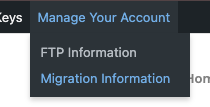
- Click the Get Started button
- Follow the instructions to establish and set up your Reclaim Hosting account.
If you have questions, please reach out to support@reclaimhosting.com
