
Recently, we discovered that the version of PHP, which is the language that WordPress is built on, was updated across all CI Keys sites. In some cases, this update caused WordPress sites to show fatal errors, like the one below, when they were visited and it became impossible to view the site or access the WordPress dashboard. Fortunately, when the PHP version is responsible for causing the fatal error, it’s an easy fix.

Revert PHP to a Previous Version
- Login to CI Keys
- Search the Dashboard (cPanel) for a tool called MultiPHP Manager. Click it to launch the tool.
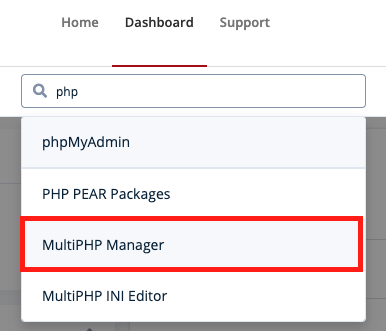
- Within MultiPHP Manager you’ll see a list of any sites that you’ve created within your CI Keys account. Check the box next to the domain containing the site that has the fatal error on it

- Towards the top of the MultiPHP Manager tool, click the PHP Version drop-down and select PHP 7.4

- Click the Apply button
- After the PHP version has been updated, navigate to your site in a new tab and see if the site loads without the fatal error.
If your CI Keys site still displays a fatal error and does not load correctly after doing the steps above, please reach out to tlinnovations@csuci.edu and we’ll look into the issue further.
