
Starting in Spring 2025, Khanmigo Teacher Tools is available to instructors within CI Learn. Khanmigo Teacher Tools is a free, AI-powered teaching assistant from Khan Academy that helps teachers streamline their prep work and save time. It’s an opt-in tool that can be added to your course menu at any time and is only available to instructors in a course.
Adding Kahnmigo Teacher Tools to Your Course Menu
Before you can access and use Khanmigo Teacher Tools in your course, you’ll need to add it to your course menu.
- Within your course, click Settings
- Click the Navigation tab at the top of the screen
- Scroll down to the lower section of the page until you see the Khanmigo Teacher Tools item. Click the three dots to the right of it and select the Activate option.
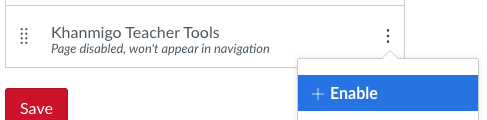
- Scroll down to the bottom of the page and click the Save button
Getting Started with Kahnmigo Teacher Tools
Once you’ve added the Khanmigo Teacher Tools link to your course menu, you can click the link to get started.
- Click the Khanmigo Teacher Tools link in your course menu
- The first time you click the link you’ll be presented with a welcome screen. Click the Sign up for Free button.
- A pop-up will appear notifying you that an email will be sent to your CSUCI email where you’ll be asked to set a password for accessing Khanmigo for Teachers outside of Canvas. You will not need this password to access Khanmigo Teacher Tools within Canvas. However, the link in the email is time-sensitive, so it’s recommended that you follow the link in the email promptly.
Check the box to agree to the terms of service and then click the Enter Khanmigo Tools button. - You will then have access to 20 different tools (expected to grow) that are grouped into 5 categories. These vary from helping to create lesson plans, crafting discussion prompts, and more.
For more information about the tools available, check out the What Tools are Available on Khanmigo article on Khan Academy.
