
The following information was taken from the Canvas Course Import or Copy and Hypothesis page created by Hypothesis.
Depending on how an assignment was configured, Hypothesis readings in a Canvas course that’s been imported or copied from a previous term may need additional attention before they work correctly in the new course.
If the Hypothesis reading…
- does not use a document stored in Canvas Files and
- the reading has not been configured to use Canvas Groups
…then you do not have to do anything else for the reading to work in the new course.
However, if you are using Canvas Files or Groups for any Hypothesis readings, you will need to take additional steps before the assignment works in the new course.
To determine if a Hypothesis reading will work properly after a course import, refer to the flowchart found on Canvas Course Import or Copy and Hypothesis page created by Hypothesis.
Will Canvas Course Import Work with My Hypothesis-enabled Readings?
- Does this Hypothesis Assignment or Module Item use Canvas Groups?
- YES — Edit the Assignment, or delete and recreate the Module item to use a group set in the new course. See the Canvas Groups Readings section below for details.
- NO — Does this Hypothesis Assignment or Module Item use a PDF stored in Canvas Files?
- YES — Take the extra steps as described in the Canvas Files Readings section below.
- NO — The reading will work in the new course without any extra steps
Canvas Groups Readings
If your Hypothesis reading was configured to use Canvas Groups, then you will need to take the following steps to make sure the reading works properly in the new course:
- Make sure you’ve created new Canvas Group Sets in the new course
- If the reading is a Module Item:
- Delete the existing reading and create and configure a new Hypothesis Module Item to use a group set in the new course
- If the reading is a Canvas Assignment:
- Edit the existing assignment
- Go to Submission Type, make sure External Tool is selected, and click the Find button.
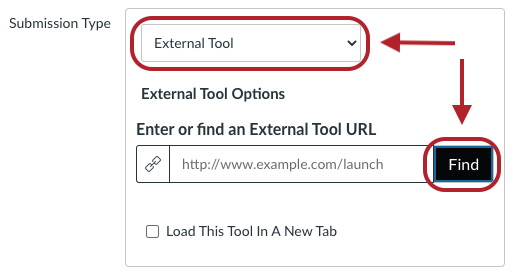
- Select Hypothesis from the list of External Tools
- Complete the steps to configure the Hypothesis reading, including re-linking to the source document and specifying the use of a Group Set in the new course
Canvas Files Readings
If your Hypothesis reading was configured to use a PDF located in Canvas Files, then you will need to take the following steps to make sure the reading works properly in the new course:
If the original source course date is before September 2021:
- Visit the source course and open any Hypothesis assignment that uses Canvas Files
- This step allows Hypothesis to perform a one-time sync of course file data on the original Canvas course and can occur either before or after the course import process
- You will only need to open one Hypothesis assignment to allow the data from all assignments to sync
- Note that you must access the assignment using an account with instructor privileges in the original source course
After the Canvas course import is complete:
- Visit the new destination course and open any Hypothesis assignment that uses Canvas Files
- This step allows Hypothesis to perform a one-time sync of course file data on the new destination Canvas course
- You will only need to open one Hypothesis assignment to allow the data from all assignments to sync
- Note that you must access the assignment using an account with instructor privileges in the new destination course
After completing the above steps, all copied Hypothesis assignments should open for students successfully. If you continue encountering issues or error messages related to Canvas file access, please see Fixing a Broken Canvas File Link for additional troubleshooting.
